<?xml version="1.0" encoding="utf-8"?><feed xmlns="http://www.w3.org/2005/Atom" ><generator uri="https://jekyllrb.com/" version="3.10.0">Jekyll</generator><link href="https://izzysec.github.io/feed.xml" rel="self" type="application/atom+xml" /><link href="https://izzysec.github.io/" rel="alternate" type="text/html" /><updated>2026-11-03T10:49:43+00:00</updated><id>https://izzysec.github.io/feed.xml</id><title type="html">izzysec</title><subtitle>CVE write-ups and security research by Isabel Mill.</subtitle><author><name>Isabel Mill</name></author><entry><title type="html">How a line break got me code execution on your build server</title><link href="https://izzysec.github.io/git-lfs-config-injection-cve-2026-105802/" rel="alternate" type="text/html" title="How a line break got me code execution on your build server" /><published>2026-10-22T00:00:00+00:00</published><updated>2026-10-22T00:00:00+00:00</updated><id>https://izzysec.github.io/git-lfs-config-injection</id><content type="html" xml:base="https://izzysec.github.io/git-lfs-config-injection-cve-2026-105802/"><![CDATA[<p>CVE-2026-105802 · Git LFS · reported by <a href="https://github.com/izzysec">izzysec</a></p>

<p>Almost all software today is built on code written by people you have never met, and setting up someone else’s project usually means downloading it and following the steps in its instructions. Most people assume the download itself is harmless, and Git, the tool that does the downloading, mostly agrees, as does Git LFS, a popular add-on that helps Git handle big files like videos, game assets and AI models. Git LFS has a clear rule that a project you download does not get to tell it which programs to run on your computer.</p>

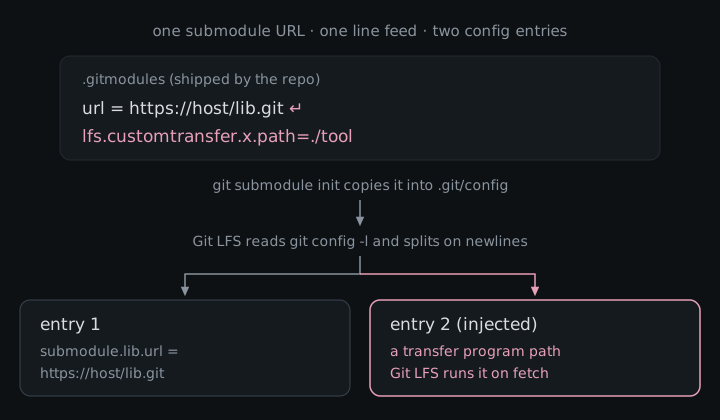
<p>I got around that rule with nothing fancier than a line break. A project can list the address of another project it depends on, and when that address had a hidden line break in it, Git LFS read the text after the break as a brand new setting that it believed you had written yourself. That setting can point at a program tucked inside the project, and Git LFS runs it the next time it downloads a big file. Build servers download and set up projects automatically all day, so on one of those the attacker’s program runs with whatever secrets the server can reach. That bug is <a href="https://github.com/git-lfs/git-lfs/security/advisories/GHSA-xrgv-7vx6-5vx6">CVE-2026-105802</a>, I reported it, and Git LFS fixed it in version 3.8.1.</p>

<figure>
  <img src="/assets/img/git-lfs-newline-config.svg" alt="A .gitmodules file holds one submodule URL containing a line feed. After git submodule init copies it into .git/config, Git LFS splits the config on newlines and reads two entries: the submodule URL, and an injected setting naming a transfer program that Git LFS runs on fetch." />
  <figcaption>One value in the repo, two settings by the time Git LFS reads it.</figcaption>
</figure>

<h2 id="what-git-lfs-actually-is">What Git LFS actually is</h2>

<p>Git was built for source code, and it is famously bad at large binaries because every clone drags down every version of every file. <a href="https://git-lfs.com">Git LFS</a> (Large File Storage) works around that by committing a small text pointer in place of each big file and keeping the real content on a separate LFS server, which it downloads when you check the file out. GitHub <a href="https://github.blog/news-insights/product-news/announcing-git-large-file-storage-lfs/">announced it in April 2015</a> as an open source, MIT-licensed extension for “audio samples, datasets, graphics, and videos”, and the <a href="https://github.com/git-lfs/git-lfs">git-lfs/git-lfs</a> repo itself goes back to September 2013, with its first tagged release in August 2014.</p>

<p>It was not the first attempt at the problem. <a href="https://git-annex.branchable.com/">git-annex</a> has been around since at least 2010 (it was in Debian that November), and smaller tools like <a href="https://github.com/jedbrown/git-fat">git-fat</a> and <a href="https://github.com/alebedev/git-media">git-media</a> handled large files outside Git in similar ways. These days Git itself also has <a href="https://git-scm.com/docs/partial-clone">partial clone</a> with promisor remotes, which can skip downloading old versions of large binary assets. What Git LFS has going for it is that the big forges adopted it: <a href="https://docs.gitlab.com/topics/git/lfs/">GitLab</a> enables it by default on GitLab.com and self-managed instances, <a href="https://support.atlassian.com/bitbucket-cloud/docs/use-git-lfs-with-bitbucket/">Bitbucket</a> and <a href="https://learn.microsoft.com/en-us/azure/devops/repos/git/manage-large-files">Azure DevOps</a> document it as the way to handle large binaries, GitHub’s own <a href="https://github.com/actions/checkout/blob/main/action.yml"><code class="language-plaintext highlighter-rouge">actions/checkout</code></a> has an <code class="language-plaintext highlighter-rouge">lfs</code> switch, and <a href="https://github.com/git-for-windows/build-extra/blob/main/ReleaseNotes.md">Git for Windows</a> ships it bundled and enabled by default. Even the <a href="https://huggingface.co/docs/hub/xet/index">Hugging Face Hub</a> historically relied on Git LFS for model weights, and still supports it after moving to its own Xet storage.</p>

<p>The numbers, as of November 2026:</p>

<table>
  <thead>
    <tr>
      <th>Where</th>
      <th>What</th>
    </tr>
  </thead>
  <tbody>
    <tr>
      <td><a href="https://github.com/git-lfs/git-lfs">GitHub repo</a></td>
      <td>about 14.5k stars, 2.3k forks</td>
    </tr>
    <tr>
      <td><a href="https://github.com/git-lfs/git-lfs/releases">GitHub release assets</a></td>
      <td>about 31 million downloads across 97 releases, and about 97k for v3.8.1 alone in its first ten days</td>
    </tr>
    <tr>
      <td><a href="https://formulae.brew.sh/formula/git-lfs">Homebrew</a></td>
      <td>about 263k installs in the last year</td>
    </tr>
    <tr>
      <td><a href="https://github.com/git-for-windows/build-extra/blob/main/ReleaseNotes.md">Git for Windows</a></td>
      <td>bundled and on by default, so a lot of people have it without ever installing it on purpose</td>
    </tr>
  </tbody>
</table>

<p>So Git LFS sits on a huge number of developer laptops and CI runners, and a bug that fires on clone-and-setup is a supply-chain bug almost by definition.</p>

<h2 id="how-the-attack-works">How the attack works</h2>

<p>A few terms, once:</p>

<ul>
  <li><strong>Git config</strong>: the list of settings Git and Git LFS read, stored in a few files on your machine, including one inside every project you download.</li>
  <li><strong>Repo settings file</strong>: a project can ship its own Git LFS settings file (called <code class="language-plaintext highlighter-rouge">.lfsconfig</code>), but Git LFS only accepts harmless options from it, and anything that names a program to run is blocked.</li>
  <li><strong>Submodule</strong>: a project nested inside another project, like a library it depends on. The outer project lists the submodule’s address in a file it ships.</li>
  <li><strong>Submodule init</strong>: the setup step (<code class="language-plaintext highlighter-rouge">git submodule init</code>) that copies those addresses into your own local settings, which Git LFS trusts completely because it assumes you wrote them.</li>
  <li><strong>Transfer adapter / extension</strong>: Git LFS features that let you name an outside program to download your big files or to process them when you save or open them.</li>
</ul>

<p>Here is where it breaks. Git LFS read your settings by asking Git for the whole list and cutting it up line by line, treating each line as one setting. The problem is that a setting’s value is allowed to contain a line break, and in that list the line break inside a value looks exactly like the line break between two settings. So a submodule address with a hidden line break, followed by something that looks like a Git LFS setting, comes out the other end as two settings, and Git LFS believes both. The project is not allowed to name programs through its own settings file, but it is allowed to list a submodule address, and the setup step politely copies that address into the one place Git LFS trusts without question. Git does not even visit the address during that step, so nothing looks off.</p>

<p>Attacker path, start to finish:</p>

<ol>
  <li>Create a repo that tracks some files with Git LFS and declares a submodule.</li>
  <li>Give that submodule an address with a hidden line break in it, followed by a Git LFS setting that names a program as a transfer adapter or extension.</li>
  <li>Ship that program inside the project itself, which is exactly how Git LFS’s own test for this bug is built.</li>
  <li>Get the victim, or their build server, to download the project and run the submodule setup step, which many setups do automatically.</li>
  <li>The next time Git LFS downloads big files or the victim saves a tracked file, it runs the attacker’s program with the victim’s permissions.</li>
</ol>

<p>Git LFS’s own test shows how quiet this can be. The injected setting replaces one of Git LFS’s built-in download helpers, so a completely ordinary download command is what ends up starting the attacker’s program.</p>

<h2 id="the-second-bug-unquoted-ssh-paths">The second bug: unquoted SSH paths</h2>

<p>While digging around Git LFS I also reported a second bug, <a href="https://github.com/git-lfs/git-lfs/security/advisories/GHSA-w3f2-pr6x-wwjc">CVE-2026-69260</a>, though <a href="https://github.com/dungNHVhust">@dungNHVhust</a> reported it first, so the advisory is credited to them. It belongs in this post because it is the same mistake in a different spot: Git LFS again took text from a downloaded project and used it without cleaning it up first. Git LFS can talk to its file server over SSH, the same secure remote login developers use to reach servers. When it does, it logs in and asks the server to run a small Git LFS command, and it passed along the project’s path from the server address without wrapping it in quotes. A project’s settings file is allowed to choose that server address, so a malicious project could pick an address whose path contained characters a server’s command line treats as “and now run this too”, like a semicolon.</p>

<p>The difference is where the code runs. This one executes on the remote SSH host, as whatever account the victim’s SSH client logs in to, and only if that host hands the command string to a shell without sanitizing it. Servers that parse the command properly are not affected, and GitHub’s advisory reflects that condition by scoring it 7.6 with attack requirements present, against 8.6 for the first bug.</p>

<table>
  <thead>
    <tr>
      <th> </th>
      <th>CVE-2026-105802</th>
      <th>CVE-2026-69260</th>
    </tr>
  </thead>
  <tbody>
    <tr>
      <td>Where the trick hides</td>
      <td>a submodule address</td>
      <td>the file server address in the project’s settings</td>
    </tr>
    <tr>
      <td>What goes wrong</td>
      <td>a line break splits one setting into two</td>
      <td>the server path is sent without quotes</td>
    </tr>
    <tr>
      <td>Where code runs</td>
      <td>the victim’s machine</td>
      <td>the SSH server, if it passes commands to a shell</td>
    </tr>
    <tr>
      <td>Affected since</td>
      <td>0.6.0</td>
      <td>0.5.0</td>
    </tr>
    <tr>
      <td>GitHub advisory severity</td>
      <td>High, CVSS v4 8.6</td>
      <td>High, CVSS v4 7.6</td>
    </tr>
  </tbody>
</table>

<h2 id="what-an-attacker-could-do">What an attacker could do</h2>

<p>The attacker’s program runs as whoever downloaded the project, with all of their access. On a developer’s laptop that means things like SSH keys, saved logins and the code of every other project they work on, and on a build server it means the deploy keys and tokens that server uses. If those keys can push code or publish releases, the attacker can move from one poisoned project into everything that server builds, which is how a single bad download turns into a supply-chain problem. The second bug, CVE-2026-69260, reaches less far, because its command runs on the SSH server as the account the victim logs in to, and only when that server hands the command to a shell without cleaning it first.</p>

<h2 id="what-it-actually-takes">What it actually takes</h2>

<p>For CVE-2026-105802 the victim has to clone a repository the attacker controls or has slipped a change into, initialize its submodules, and then run a Git LFS operation that fetches objects or adds a tracked file. For CVE-2026-69260 the victim has to use Git LFS on a project whose settings point at an SSH server address, and that server has to pass the command to its command line without cleaning it. Every Git LFS release from 0.6.0 through 3.8.0 is affected by both, on every operating system Git LFS supports. Neither had a CVE record or NVD score when I checked, so the severities above are the ones from GitHub’s advisories.</p>

<h2 id="the-fix">The fix</h2>

<p>Both are patched in <strong>Git LFS 3.8.1</strong> (<a href="https://github.com/git-lfs/git-lfs/releases/tag/v3.8.1">release notes</a>), along with two other fixes in the same release.</p>

<p>For CVE-2026-105802, <a href="https://github.com/git-lfs/git-lfs/commit/39b73aa4db821fea6f0da8320128e5e1b919942d">commit 39b73aa</a> makes Git LFS ask Git for the settings list in a format where each setting ends with a special invisible marker instead of a line break, so a line break inside a value stays inside that value. The commit adds tests that try to inject both a transfer adapter and a pointer extension through a submodule URL and check that neither runs. If you cannot upgrade yet, the <a href="https://github.com/git-lfs/git-lfs/security/advisories/GHSA-xrgv-7vx6-5vx6">advisory</a> recommends skipping the submodule setup step entirely and turning off the Git options that run it automatically.</p>

<p>For CVE-2026-69260, <a href="https://github.com/git-lfs/git-lfs/commit/92d81117d465469a61dcb78546dd3d88806b25fd">commit 92d8111</a> wraps everything Git LFS sends to the server in proper quotes, the same way Git itself does. The <a href="https://github.com/git-lfs/git-lfs/security/advisories/GHSA-w3f2-pr6x-wwjc">advisory</a> also says server operators should clean incoming commands either way.</p>

<p>Advisories: <a href="https://github.com/git-lfs/git-lfs/security/advisories/GHSA-xrgv-7vx6-5vx6">GHSA-xrgv-7vx6-5vx6</a> · CVE-2026-105802 · <a href="https://github.com/git-lfs/git-lfs/security/advisories/GHSA-w3f2-pr6x-wwjc">GHSA-w3f2-pr6x-wwjc</a> · CVE-2026-69260</p>

<p>Both bugs came down to Git LFS treating text from a cloned repo as if it were already parsed and quoted, and 3.8.1 makes it do that work itself.</p>]]></content><author><name>Isabel Mill</name></author><category term="cve" /><category term="git-lfs" /><category term="supply-chain" /><summary type="html"><![CDATA[A hidden line break in a downloaded project tricked Git LFS into running the attacker's program, on laptops and build servers alike. How it worked and the fix in 3.8.1.]]></summary><media:thumbnail xmlns:media="http://search.yahoo.com/mrss/" url="https://izzysec.github.io/assets/img/social/git-lfs-config-injection.png" /><media:content medium="image" url="https://izzysec.github.io/assets/img/social/git-lfs-config-injection.png" xmlns:media="http://search.yahoo.com/mrss/" /></entry><entry><title type="html">How I got malware past code review</title><link href="https://izzysec.github.io/gitea-duplicate-tree-cve-2026-95106/" rel="alternate" type="text/html" title="How I got malware past code review" /><published>2026-10-06T00:00:00+00:00</published><updated>2026-10-06T00:00:00+00:00</updated><id>https://izzysec.github.io/how-to-get-malware-past-code-review</id><content type="html" xml:base="https://izzysec.github.io/gitea-duplicate-tree-cve-2026-95106/"><![CDATA[<p>CVE-2026-95106 · Gitea · reported by <a href="https://github.com/izzysec">izzysec</a></p>

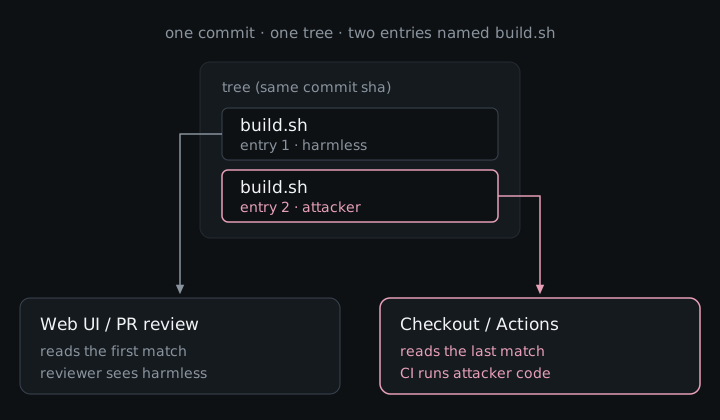
<p>Imagine you open a pull request that looks boring on purpose. The Files changed tab only shows a tidy <code class="language-plaintext highlighter-rouge">build.sh</code>, so a reviewer approves exactly what the UI put in front of them, and then Gitea Actions checks out that exact commit and runs a different <code class="language-plaintext highlighter-rouge">build.sh</code> (the one with your payload) with the repo’s CI secrets sitting right there. Same commit hash, two files with the same name: the web UI showed the first one, checkout used the last. That mismatch is <a href="https://github.com/go-gitea/gitea/security/advisories/GHSA-6pv5-8rp7-8c75">CVE-2026-95106</a>.</p>

<figure>
  <img src="/assets/img/gitea-duplicate-tree.svg" alt="One commit whose tree has two entries named build.sh. The Gitea web UI stops at the first, harmless one. Checkout, Gitea Actions and git archive use the last one, the attacker script." />
  <figcaption>Same commit, same name, two different files depending on who is reading.</figcaption>
</figure>

<h2 id="what-gitea-actually-is">What Gitea actually is</h2>

<p><a href="https://gitea.com">Gitea</a> is the self-hosted forge people reach for when GitHub or GitLab SaaS is not the plan. One binary (or a Docker container) gives you issues, PRs, a package registry, and CI via Gitea Actions, which is exactly what teams want when the code has to stay on their own machines because of air-gapped networks, privacy rules, cost, or the simple preference for running their own stuff.</p>

<p>It is not niche. As of late October 2026 the <a href="https://github.com/go-gitea/gitea">go-gitea/gitea</a> repo sits around <strong>59k GitHub stars</strong>, the official <a href="https://hub.docker.com/r/gitea/gitea"><code class="language-plaintext highlighter-rouge">gitea/gitea</code></a> image on Docker Hub has roughly <strong>393 million pulls</strong>, and a May 2026 Shodan sweep covered by <a href="https://www.securityweek.com/gitea-vulnerability-exposed-30000-deployments-to-attacks/">SecurityWeek</a> found about <strong>34,000 internet-facing</strong> instances, with a big chunk of those living on real cloud or VPS hosts. So when review and execution disagree on Gitea, you are talking about a lot of self-hosted supply chains, not a lab curiosity.</p>

<h2 id="how-the-attack-works">How the attack works</h2>

<p>A few terms, once:</p>

<ul>
  <li><strong>Tree</strong>: git’s snapshot of a directory, a list of entries where each entry has a name and points to a file.</li>
  <li><strong>Checkout</strong>: unpacking that snapshot onto disk (<code class="language-plaintext highlighter-rouge">git checkout</code>, or what CI does when it clones your PR).</li>
  <li><strong>CI / Gitea Actions</strong>: the bots that clone the PR commit and run whatever workflow you configured, usually with secrets.</li>
</ul>

<p>The mismatch is almost embarrassingly simple once you see how the UI looks up a file. Gitea walks the tree’s entry list looking for the name you asked for (say <code class="language-plaintext highlighter-rouge">build.sh</code>), returns the first match, and stops. It never scrolls down to notice that a second entry with the same name is sitting later in the list. Checkout, Gitea Actions, and release archives do the opposite: when the same name appears twice, they use the last one. Most people review in the browser, so the only copy they are ever shown is the decoy.</p>

<p>Attacker path, start to finish:</p>

<ol>
  <li>Build two blobs. One is harmless (<code class="language-plaintext highlighter-rouge">echo BENIGN</code>). One is whatever you want CI to run.</li>
  <li>Hand-craft a tree where <code class="language-plaintext highlighter-rouge">build.sh</code> appears twice: benign first, evil last.</li>
  <li>Wrap it in a normal commit and push a branch, then open a PR against a repo that runs Actions on pull requests.</li>
  <li>Watch the PR diff and file view. Because Gitea’s name lookup returns the first match and stops, reviewers see the clean script.</li>
  <li>Wait for approval (or whatever your target needs). Actions checks out the same sha, and because checkout and <code class="language-plaintext highlighter-rouge">git archive</code> resolve the last entry, your script runs with CI secrets.</li>
</ol>

<table>
  <thead>
    <tr>
      <th>Same commit</th>
      <th>What you get</th>
    </tr>
  </thead>
  <tbody>
    <tr>
      <td>Gitea web UI / PR Files changed</td>
      <td>first <code class="language-plaintext highlighter-rouge">build.sh</code> (benign)</td>
    </tr>
    <tr>
      <td><code class="language-plaintext highlighter-rouge">git checkout</code>, Gitea Actions, release archives</td>
      <td>last <code class="language-plaintext highlighter-rouge">build.sh</code> (attacker code)</td>
    </tr>
  </tbody>
</table>

<h2 id="why-didnt-gitea-reject-it">Why didn’t Gitea reject it?</h2>

<p>You might be wondering how a commit with two files named <code class="language-plaintext highlighter-rouge">build.sh</code> ever got into the repo at all. Git itself already knows that is illegal. Its built-in health check (<code class="language-plaintext highlighter-rouge">git fsck</code>) calls it an <strong>ERROR</strong> named <code class="language-plaintext highlighter-rouge">duplicateEntries</code>, and everyday git commands refuse to create a tree like that. The attacker has to write the raw tree bytes by hand and force them in.</p>

<p>Here is the catch: when someone pushes to a server, git does <strong>not</strong> run that health check by default. The settings that would (<code class="language-plaintext highlighter-rouge">receive.fsckObjects</code> / <code class="language-plaintext highlighter-rouge">transfer.fsckObjects</code>) start turned off, so a forge only rejects these weird trees if someone explicitly turns the check on.</p>

<p>GitLab already did. <a href="https://docs.gitlab.com/administration/gitaly/consistency_checks/">Gitaly</a> checks incoming objects on push and only skips a few cosmetic rules by default (<code class="language-plaintext highlighter-rouge">badTimezone</code>, <code class="language-plaintext highlighter-rouge">missingSpaceBeforeDate</code>, <code class="language-plaintext highlighter-rouge">zeroPaddedFilemode</code>). Duplicate names are not on that skip list, so GitLab rejects this push.</p>

<p>Gitea just never turned the switch on. The malformed tree was accepted, the web UI showed the first <code class="language-plaintext highlighter-rouge">build.sh</code>, and checkout used the second.</p>

<h2 id="what-an-attacker-could-do">What an attacker could do</h2>

<p>Gitea runs CI workflows with whatever secrets and tokens the repository owner gave them, so a script that slips past review gets exactly the same access. At the very least it can read and send out those secrets, and if the tokens are allowed to push code or publish packages, it can also plant a backdoor in the project or tamper with the release files people download, since <code class="language-plaintext highlighter-rouge">git archive</code> builds them from the same hidden copy of the file. The logs show one commit hash for both the code that was reviewed and the code that ran, so anyone checking later would find nothing out of place, and for a project that publishes what its CI builds, a single approved pull request could end up in the hands of everyone who installs the next release.</p>

<h2 id="what-it-actually-takes">What it actually takes</h2>

<p>You need push or PR access (a fork is enough on many setups), a workflow that actually runs something from the checked-out tree, and a review path that goes through the web UI. It is a supply-chain problem because code review is the gate, and the gate looked at the wrong file: same sha in the log, different bytes on the runner.</p>

<h2 id="the-fix">The fix</h2>

<p>Patched in <strong>Gitea 28.0.0</strong> (<a href="https://blog.gitea.com/release-of-28.0.0/">release notes</a>, <a href="https://github.com/go-gitea/gitea/pull/39472">PR #39472</a>). Incoming pushes and transfers now run git’s object consistency checks, so <code class="language-plaintext highlighter-rouge">duplicateEntries</code> gets rejected before storage. Existing objects already sitting in old repos are not rescanned, so upgrade, and if you inherited weird history, go look.</p>

<p>Advisory: <a href="https://github.com/go-gitea/gitea/security/advisories/GHSA-6pv5-8rp7-8c75">GHSA-6pv5-8rp7-8c75</a> · CVE-2026-95106</p>

<p>Gitea now runs the same push check GitLab already had, which means the review and the runner finally see the same file.</p>]]></content><author><name>Isabel Mill</name></author><category term="cve" /><category term="gitea" /><category term="supply-chain" /><summary type="html"><![CDATA[Gitea showed reviewers one file and let CI run another with the same name. How duplicate tree entries split code review from checkout, and the fix in 28.0.0.]]></summary><media:thumbnail xmlns:media="http://search.yahoo.com/mrss/" url="https://izzysec.github.io/assets/img/social/gitea-duplicate-tree.png" /><media:content medium="image" url="https://izzysec.github.io/assets/img/social/gitea-duplicate-tree.png" xmlns:media="http://search.yahoo.com/mrss/" /></entry><entry><title type="html">Pollute one prototype, steal every Git token</title><link href="https://izzysec.github.io/isomorphic-git-prototype-pollution-cve-2026-89011/" rel="alternate" type="text/html" title="Pollute one prototype, steal every Git token" /><published>2026-09-10T00:00:00+00:00</published><updated>2026-09-10T00:00:00+00:00</updated><id>https://izzysec.github.io/isomorphic-git-prototype-pollution</id><content type="html" xml:base="https://izzysec.github.io/isomorphic-git-prototype-pollution-cve-2026-89011/"><![CDATA[<p>CVE-2026-89011 · isomorphic-git · reported by <a href="https://github.com/izzysec">izzysec</a></p>

<p>Asking a Git server which branches it has is about the most harmless thing a program can do. Nothing gets downloaded and nothing runs, so apps happily do it for any address a user pastes into an “import a repository” box, mostly just to fill in a dropdown. Nobody expects a list of branch names to be able to change how the rest of the app behaves.</p>

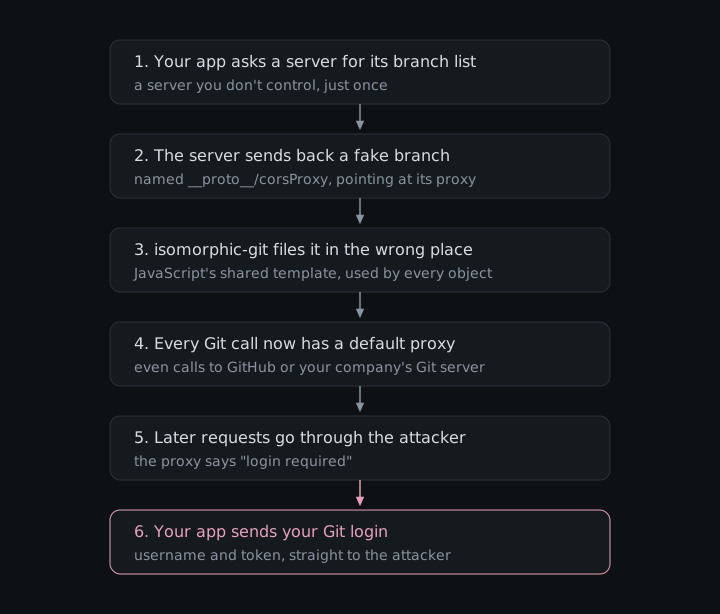
<p>In isomorphic-git, a JavaScript library that lets web pages and Node.js apps speak Git, it could. When the library turned a server’s branch list into a JavaScript object, a name starting with <code class="language-plaintext highlighter-rouge">__proto__</code> didn’t create a branch at all, but changed the built-in template that every object in the app inherits from. That’s a bug class called prototype pollution, and in this case the attacker could use it to quietly add a proxy setting to everything. From then on, the app’s later Git requests that didn’t name a proxy of their own, including ones meant for GitHub or a company Git server, went through the attacker’s proxy, which only had to ask for a password to receive one. It was fixed in isomorphic-git 1.42.0 on September 10, 2026, and the CVE record and the GitHub advisory both rate it 7.1 High on CVSS 3.1.</p>

<figure>
  <img src="/assets/img/isomorphic-git-proto.svg" alt="Six steps: your app asks a server for its branch list, the server sends back a fake branch named __proto__/corsProxy, isomorphic-git files it in JavaScript's shared template, every Git call now has a default proxy, later requests go through the attacker, and your app sends your Git login to the attacker." />
  <figcaption>One branch list goes in, and every later Git request takes a detour.</figcaption>
</figure>

<h2 id="what-isomorphic-git-actually-is">What isomorphic-git actually is</h2>

<p>Git normally means the <code class="language-plaintext highlighter-rouge">git</code> command-line program, which is written in C and has to be installed on the computer. That’s no use to a web page, which can only run JavaScript, and it’s awkward for Node.js apps that would rather not depend on whatever happens to be installed. isomorphic-git is Git rewritten in pure JavaScript, so the same code can clone, commit and push from a browser tab or a Node.js server (“isomorphic” is JavaScript jargon for code that runs in both places).</p>

<table>
  <thead>
    <tr>
      <th>What</th>
      <th>Number</th>
      <th>Source</th>
    </tr>
  </thead>
  <tbody>
    <tr>
      <td>GitHub stars</td>
      <td>about 8.4k</td>
      <td><a href="https://github.com/isomorphic-git/isomorphic-git">GitHub</a></td>
    </tr>
    <tr>
      <td>npm downloads, last week</td>
      <td>about 3.31 million</td>
      <td><a href="https://www.npmjs.com/package/isomorphic-git">npm</a></td>
    </tr>
    <tr>
      <td>Of those, versions before 1.42.0</td>
      <td>about 64%</td>
      <td><a href="https://api.npmjs.org/versions/isomorphic-git/last-week">npm version stats</a></td>
    </tr>
  </tbody>
</table>

<p>Numbers as of November 2026. Downloads aren’t the same as installs, since build servers download the same thing over and over, but two out of three downloads going to old versions two months after the fix is still a lot.</p>

<p>It shows up in places you might not expect, such as the <a href="https://github.com/Vinzent03/obsidian-git">Obsidian Git</a> plugin that syncs notes to a repository, the Git-backed content manager <a href="https://github.com/tinacms/tinacms">TinaCMS</a>, and the scaffolder in Spotify’s developer portal <a href="https://github.com/backstage/backstage">Backstage</a>, the part that creates new repositories from templates.</p>

<h2 id="a-short-history-of-polluted-prototypes">A short history of polluted prototypes</h2>

<p>Prototype pollution, tricking code into changing a template that every JavaScript object quietly inherits from, is a JavaScript classic. The best-known examples are in lodash, the hugely popular utility library, whose merge functions could be tricked into it in <a href="https://nvd.nist.gov/vuln/detail/CVE-2018-3721">2018</a> and whose <code class="language-plaintext highlighter-rouge">defaultsDeep</code> was caught at it again in <a href="https://nvd.nist.gov/vuln/detail/CVE-2019-10744">2019</a>. The usual cause is the same pattern behind this bug, code that takes names from outside and turns <code class="language-plaintext highlighter-rouge">a/b/c</code>-style paths into nested objects. isomorphic-git had a busy 2026, with six advisories between July and August about path traversal, symlinks and memory exhaustion, but this was its first prototype pollution.</p>

<h2 id="how-the-attack-works">How the attack works</h2>

<p>A few terms, once:</p>

<ul>
  <li><strong>Ref</strong>: Git’s word for a named pointer to a commit. Branches and tags are both refs, with full names like <code class="language-plaintext highlighter-rouge">refs/heads/main</code>.</li>
  <li><strong>getRemoteInfo</strong>: the isomorphic-git function that asks a server for its list of refs. The server answers with names and the commit IDs they point to.</li>
  <li><strong>Prototype</strong>: in JavaScript, almost every object quietly inherits from one shared template object. If you ask an object for a setting it doesn’t have, JavaScript checks the template. <code class="language-plaintext highlighter-rouge">__proto__</code> is a special name that leads to that template instead of to a normal property.</li>
  <li><strong>Prototype pollution</strong>: tricking code into writing onto that shared template, so a value appears as a default on every object in the program.</li>
  <li><strong>CORS proxy</strong>: a relay server. Browsers block web pages from talking directly to most Git hosts, so browser apps send their Git traffic through a proxy, which isomorphic-git takes as an option called <code class="language-plaintext highlighter-rouge">corsProxy</code>.</li>
  <li><strong>onAuth</strong>: a function the app gives isomorphic-git, which it calls when a server asks for a login. The app answers with the right username and token.</li>
</ul>

<p><code class="language-plaintext highlighter-rouge">getRemoteInfo</code> turns the server’s flat list of refs into a nested object, splitting each name on <code class="language-plaintext highlighter-rouge">/</code> and creating one level per part, so <code class="language-plaintext highlighter-rouge">refs/heads/main</code> becomes <code class="language-plaintext highlighter-rouge">refs</code>, then <code class="language-plaintext highlighter-rouge">heads</code>, then <code class="language-plaintext highlighter-rouge">main</code>. Its source comment explains this is because “99% of the time that will be easier to use”. The loop never checked the parts, so when a part was <code class="language-plaintext highlighter-rouge">__proto__</code>, it walked straight into the shared template and wrote the last part there as a setting, with the “commit ID” as its value. isomorphic-git didn’t check that the commit ID looked like one, so the server picks both the setting name and its value. This loop has been there since <code class="language-plaintext highlighter-rouge">getRemoteInfo</code> was added in 2018.</p>

<p>The setting worth picking is <code class="language-plaintext highlighter-rouge">corsProxy</code>. isomorphic-git reads its options in a way that also looks at the template, so after the pollution, every later network call in the same browser tab or Node.js process that didn’t set its own <code class="language-plaintext highlighter-rouge">corsProxy</code> gets the attacker’s proxy as a default. When that proxy replies “401, please log in”, isomorphic-git calls <code class="language-plaintext highlighter-rouge">onAuth</code> for the host the app actually meant to reach and sends the answer to the proxy. The pollution lasts until the tab is reloaded or the process restarts. The <a href="https://github.com/isomorphic-git/isomorphic-git/security/advisories/GHSA-83vg-jxvh-fx76">advisory</a> has the full reproduction.</p>

<p>The diagram above is the whole attack. The only part it skips is how the attacker gets your app to look at their server in the first place, which can be as simple as a repository address pasted into the “connect a repository” or “import from URL” field of a web IDE, a CMS, a docs tool or an internal developer portal built on isomorphic-git. After that, nothing visible happens until the next login.</p>

<p>The supply-chain angle comes from what gets stolen, which is usually a Git token that can push code. Reading the code, the pollution affects everyone sharing the process, so on a server that handles many users, like a hosted editor or a developer portal, one person’s malicious address could redirect other users’ logins too until the next restart.</p>

<h2 id="what-an-attacker-could-do">What an attacker could do</h2>

<p>The confirmed impact is credential theft. The attacker receives whatever usernames, passwords or tokens the app hands out through <code class="language-plaintext highlighter-rouge">onAuth</code>, for any Git host the app contacts afterwards in that tab or process, not just for the attacker’s own server. With a token that can push, they can read private repositories, push commits and tamper with code that other people build and install. Since the request passes through their proxy, reading the code they could also forward it on so everything keeps working and nobody notices. Nothing in this bug runs code on the victim’s machine directly.</p>

<h2 id="what-it-actually-takes">What it actually takes</h2>

<p>The app has to use an isomorphic-git version before 1.42.0, it has to call <code class="language-plaintext highlighter-rouge">getRemoteInfo</code> (its newer <code class="language-plaintext highlighter-rouge">getRemoteInfo2</code>, <code class="language-plaintext highlighter-rouge">clone</code>, <code class="language-plaintext highlighter-rouge">fetch</code> and <code class="language-plaintext highlighter-rouge">push</code> don’t build this object), and it has to point that call at an address the attacker controls, which usually means a user pasting one in. The theft also needs a later network call in the same tab or process that doesn’t set its own <code class="language-plaintext highlighter-rouge">corsProxy</code>, with credentials supplied through <code class="language-plaintext highlighter-rouge">onAuth</code>.</p>

<h2 id="the-fix">The fix</h2>

<p>Update to isomorphic-git <a href="https://github.com/isomorphic-git/isomorphic-git/releases/tag/v1.42.0">1.42.0</a> or later; the latest as of November 2026 is 1.44.9. The fix in <a href="https://github.com/isomorphic-git/isomorphic-git/pull/2426">#2426</a>, by jcubic, adds a helper that skips any ref whose path contains <code class="language-plaintext highlighter-rouge">__proto__</code> and only reuses levels of the tree that really belong to it, so names like <code class="language-plaintext highlighter-rouge">constructor</code> get a fresh object instead of reaching the template. Tests check that the template stays clean. The CVE record lists all versions before 1.42.0 as affected, which matches the code, while the GitHub advisory names 1.40.0 to 1.41.9. Since <code class="language-plaintext highlighter-rouge">npm audit</code> won’t flag it, check the version yourself with <code class="language-plaintext highlighter-rouge">npm ls isomorphic-git</code>, including copies pulled in by other packages.</p>

<h2 id="reporting-it">Reporting it</h2>

<p>I reported it with VulnCheck, a CNA (one of the organizations allowed to assign CVE numbers), coordinating the disclosure. jcubic opened the fix and merged it about half an hour later, and version 1.42.0, the advisory and <a href="https://www.cve.org/CVERecord?id=CVE-2026-89011">CVE-2026-89011</a> all went public on September 10, 2026. If you maintain something built on isomorphic-git, the upgrade is a one-line change, which is a pleasant price for no longer letting a branch list edit JavaScript itself.</p>

<p>Advisories: <a href="https://www.cve.org/CVERecord?id=CVE-2026-89011">CVE-2026-89011</a> · <a href="https://github.com/isomorphic-git/isomorphic-git/security/advisories/GHSA-83vg-jxvh-fx76">GHSA-83vg-jxvh-fx76</a> · <a href="https://www.vulncheck.com/advisories/isomorphic-git-prototype-pollution-via-getremoteinfo">VulnCheck</a> · <a href="https://github.com/isomorphic-git/isomorphic-git/pull/2426">Fix PR #2426</a></p>]]></content><author><name>Isabel Mill</name></author><category term="cve" /><category term="isomorphic-git" /><category term="javascript" /><category term="prototype-pollution" /><category term="supply-chain" /><summary type="html"><![CDATA[Prototype pollution in isomorphic-git: one look at a malicious Git server's branch list could make an app send its later Git logins, even for GitHub, to the attacker's proxy.]]></summary><media:thumbnail xmlns:media="http://search.yahoo.com/mrss/" url="https://izzysec.github.io/assets/img/social/isomorphic-git-prototype-pollution.png" /><media:content medium="image" url="https://izzysec.github.io/assets/img/social/isomorphic-git-prototype-pollution.png" xmlns:media="http://search.yahoo.com/mrss/" /></entry><entry><title type="html">A poisoned Git link could run commands on your server, logged in as you</title><link href="https://izzysec.github.io/libgit2-ssh-command-injection-cve-2026-5917/" rel="alternate" type="text/html" title="A poisoned Git link could run commands on your server, logged in as you" /><published>2026-08-11T00:00:00+00:00</published><updated>2026-08-11T00:00:00+00:00</updated><id>https://izzysec.github.io/libgit2-ssh-command-injection</id><content type="html" xml:base="https://izzysec.github.io/libgit2-ssh-command-injection-cve-2026-5917/"><![CDATA[<p>CVE-2026-5917 · libgit2 · reported by <a href="https://github.com/izzysec">izzysec</a></p>

<p>Most developers set up SSH access to a work server once, add their key, and never think about it again, which is the whole appeal. From then on their tools log in for them whenever they need code from that server, and the server trusts them because it trusts the key. The arrangement quietly assumes that your tools only ever ask the server for code, and that nobody else gets to choose what they ask.</p>

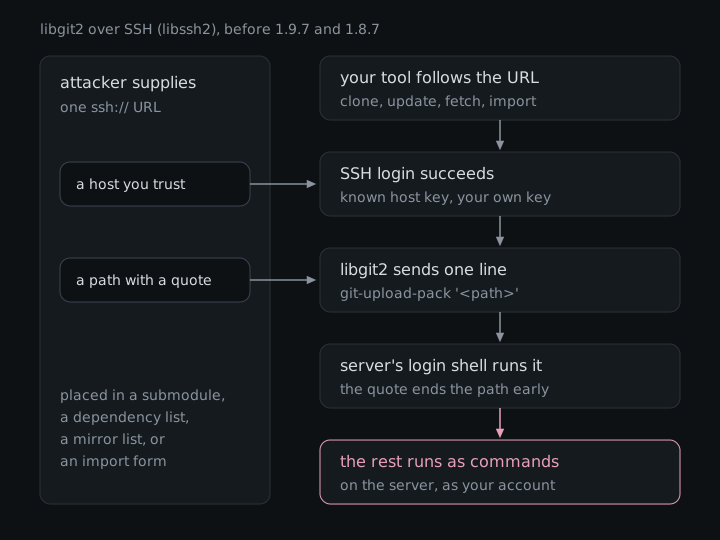
<p>In libgit2, a library that a lot of Git-speaking programs are built on, a repository address with a single quote mark in it could break that assumption. When libgit2 used its libssh2 backend to fetch code, it wrapped the address in quotes and sent it to the server without checking whether the address already contained a quote of its own, so a crafted address could end the quoting early and make the server run extra commands, logged in as you. The slightly embarrassing part is that libgit2 has two ways of speaking SSH, and exactly this problem had already been fixed in the other one in December 2025. The libssh2 backend kept it for eight more months, until libgit2 1.9.7 and 1.8.7 in August 2026. The CVE record rates it 8.8 High on CVSS 3.1 and 8.6 High on CVSS 4.0.</p>

<figure>
  <img src="/assets/img/libgit2-ssh.svg" alt="The attacker supplies one ssh URL: a host you trust and a path containing a quote, placed in a submodule, a dependency list, a mirror list or an import form. Your tool follows the URL, the SSH login succeeds with a known host key and your own key, libgit2 sends one line, git-upload-pack followed by the quoted path, the server's login shell runs it, the quote ends the path early, and the rest runs as commands on the server as your account." />
  <figcaption>One address goes in, and the server's shell reads part of it as commands.</figcaption>
</figure>

<h2 id="what-libgit2-actually-is">What libgit2 actually is</h2>

<p>Git, the tool almost every developer uses to track and share code, is really a bundle of command-line programs. That works fine when a person types the commands, but it is awkward when you are building an app, a website or a build system that needs to do Git things itself. libgit2 is a rewrite of Git’s core as a library that other programs can include directly. Shawn O. Pearce wrote the first draft in October 2008, the project moved to GitHub in 2010, and it is licensed under GPLv2 with a linking exception, so even closed-source products can use it. The <a href="https://libgit2.org/">libgit2 website</a> lists GitHub, GitLab, Bitbucket, Microsoft and Canonical among its users, and the <a href="https://github.com/libgit2/libgit2">main repository</a> has about 10.6k stars as of November 2026.</p>

<p>Most people never touch libgit2 directly. They use it through a binding, a wrapper that makes it usable from another programming language:</p>

<table>
  <thead>
    <tr>
      <th>Binding</th>
      <th>Language</th>
      <th>Downloads</th>
    </tr>
  </thead>
  <tbody>
    <tr>
      <td><a href="https://crates.io/crates/git2">git2</a></td>
      <td>Rust</td>
      <td>124M total</td>
    </tr>
    <tr>
      <td><a href="https://rubygems.org/gems/rugged">Rugged</a></td>
      <td>Ruby</td>
      <td>91M total</td>
    </tr>
    <tr>
      <td><a href="https://www.nuget.org/packages/LibGit2Sharp">LibGit2Sharp</a></td>
      <td>.NET</td>
      <td>34M total</td>
    </tr>
    <tr>
      <td><a href="https://pypistats.org/packages/pygit2">pygit2</a></td>
      <td>Python</td>
      <td>4.6M last month</td>
    </tr>
    <tr>
      <td><a href="https://www.npmjs.com/package/nodegit">nodegit</a></td>
      <td>Node.js</td>
      <td>126K last month</td>
    </tr>
  </tbody>
</table>

<p>Numbers as of November 2026. Not all of these are affected, because it depends on how libgit2 was built, which is covered below.</p>

<h2 id="how-the-attack-works">How the attack works</h2>

<p>A few terms, once:</p>

<ul>
  <li><strong>SSH</strong>: the standard way to log in to a remote server securely. Git uses it to fetch and push code, usually logging in with a key file instead of a password.</li>
  <li><strong>libssh2 backend and OpenSSH backend</strong>: libgit2 can speak SSH in two ways, either through libssh2, an SSH library compiled into the program, or by running the computer’s own <code class="language-plaintext highlighter-rouge">ssh</code> command. Whoever builds libgit2 picks one, and the default is no SSH at all.</li>
  <li><strong>Login shell</strong>: the command interpreter, such as <code class="language-plaintext highlighter-rouge">bash</code>, that a server account uses. When a program sends a command over SSH, the server hands the text to this shell to run.</li>
  <li><strong>git-shell</strong>: a restricted shell that only accepts Git’s own commands, often used for accounts that exist just to host repositories.</li>
  <li><strong>Submodule</strong>: a project embedded inside another project by its address, which tools fetch separately.</li>
</ul>

<p>When libgit2 fetches code over SSH, it logs in and asks the server to run one command, <code class="language-plaintext highlighter-rouge">git-upload-pack</code>, followed by the repository’s path wrapped in single quotes. Single quotes tell the server’s shell to treat everything between them as one piece of text, which is a perfectly good plan as long as the text does not contain a single quote itself. libgit2’s libssh2 backend copied the path from the address as it was, so a quote in the path closed the quoting early, and the shell read everything after it as more commands. The only check on the path was that it should not start with a dash, which stops a different trick and does nothing about this one. Going by the source of older releases, the command has been put together this way since libgit2 first got SSH support in 2013.</p>

<p>libgit2 doesn’t update submodules on its own, but the programs built on it often do, because build tools need the submodule’s code to compile anything. libgit2 also follows <code class="language-plaintext highlighter-rouge">include</code> lines in a project’s <code class="language-plaintext highlighter-rouge">.gitmodules</code> file, something Git itself ignores there, so the crafted address does not even have to appear in the file a reviewer would actually read. The full technical write-up, including how I reproduced it, is in the <a href="https://github.com/libgit2/libgit2/security/advisories/GHSA-xqj4-2j5v-rr75">advisory</a>.</p>

<p>Which builds use the libssh2 backend matters a lot here. The Rust git2 crate uses it when its <code class="language-plaintext highlighter-rouge">ssh</code> feature is turned on, pygit2’s Linux and macOS packages ship with it, nodegit compiles it in, and so do Homebrew’s libgit2 and Julia. LibGit2Sharp’s current build scripts use the OpenSSH backend instead, which already had the fix, and Rugged only includes SSH if you ask for it when installing.</p>

<p>Attacker path, start to finish:</p>

<ol>
  <li>The attacker picks a server that the target already logs into over SSH with an ordinary account, such as a company’s self-hosted Git box or build server. They don’t need any access to it themselves.</li>
  <li>They write an SSH address that points at that real server, with a repository path that contains a quote followed by the commands they want to run there.</li>
  <li>They put that address somewhere the target’s tool will follow it, most conveniently as a submodule in a project the target builds, tucked into an included file, or else in a list of Git dependencies, a mirror list, or the “import a repository” field of a service built on libgit2.</li>
  <li>The target does something completely normal, like building the project, and the tool fetches the submodule. The server’s identity checks out because it really is the trusted server, and the target’s own key logs in.</li>
  <li>The server’s login shell runs the extra commands as the target’s account, and the fetch then fails with an error that looks like any other broken submodule.</li>
</ol>

<h2 id="fixed-once-missed-once">Fixed once, missed once</h2>

<p>None of this was new to libgit2, since the OpenSSH backend had the same unescaped path and was fixed in libgit2 1.9.2 and 1.8.5 on December 6, 2025, in a commit titled “ssh_exec: escape remote paths properly” (<a href="https://github.com/libgit2/libgit2/pull/7163">#7163</a>). The libssh2 backend builds the same command from the same path in a different file, and nobody carried the fix across, so for eight months libgit2 had one SSH backend that escaped quotes and one that did not. The 1.9.7 release notes describe the eventual fix rather honestly as bringing “the same escaping to the libssh2 transport”.</p>

<h2 id="what-an-attacker-could-do">What an attacker could do</h2>

<p>The commands run on the SSH server named in the address, as the account the victim’s key logs in to, and not on the victim’s own computer. From there an attacker could read or change the repositories that account owns, or add their own key to its list of authorized keys and come back whenever they like without needing the victim again. On a self-hosted Git server that is a supply-chain foothold, since quietly editing a repository there reaches everyone who builds from it. If the victim is a service that imports repositories from addresses its users type in, the account in question is the service’s own, on whatever server that service can log in to.</p>

<h2 id="what-it-actually-takes">What it actually takes</h2>

<p>It doesn’t work against any server you like. The victim’s program has to use libgit2 built with the libssh2 backend, and it has to actually connect to the crafted address, which means someone has to build the project, update its submodules or import the URL. The server must be one the victim’s program already trusts and can log in to with the victim’s key. The account on that server must also have an ordinary login shell. Accounts locked to git-shell are not affected, because git-shell refuses an argument with broken quoting, and accounts with a forced command never pass the text to a shell at all, which I checked by running the same address against a shell account and a forced-command account. Dedicated Git hosting is normally set up one of those ways, so the realistic targets are ordinary user accounts on internal servers. CISA’s assessment in the CVE record lists no known exploitation.</p>

<h2 id="the-fix">The fix</h2>

<p>Update to libgit2 <a href="https://github.com/libgit2/libgit2/releases/tag/v1.9.7">1.9.7</a> or <a href="https://github.com/libgit2/libgit2/releases/tag/v1.8.7">1.8.7</a>, both released on August 13, 2026. The fix in <a href="https://github.com/libgit2/libgit2/pull/7347">#7347</a>, by Stephen Gallagher, is a one-line change that runs the path through the same escaping function the OpenSSH backend already used, so a quote in the path stays part of the path. Everything before 1.8.7, and 1.9.0 through 1.9.6, is affected.</p>

<p>Most people get libgit2 through something else, so the version that matters is the one bundled in your tool. pygit2’s packages moved to libgit2 1.9.7 in <a href="https://github.com/libgit2/pygit2/blob/master/CHANGELOG.md">pygit2 1.20.1</a> on September 12, 2026, the Rust <a href="https://crates.io/crates/libgit2-sys">libgit2-sys</a> crate shipped it as 0.18.8+1.9.7 on August 21, 2026, Homebrew’s libgit2 is on 1.9.7, and Debian fixed its packages in <a href="https://security-tracker.debian.org/tracker/CVE-2026-5917">DSA-6453-1</a>. nodegit and Rugged had not shipped releases with the fixed libgit2 as of November 2026. On the server side, putting accounts that only exist to host repositories behind git-shell blocks this whole class of trick regardless of which client connects.</p>

<p>If you build anything on libgit2 with SSH, it is worth checking which backend you compiled in and which libgit2 version is actually bundled, because the answer to both is easy to forget.</p>

<h2 id="two-reports-one-cve">Two reports, one CVE</h2>

<p>I found this bug in August 2026 and reported it straight to libgit2’s maintainer, who thanked me and went off to request a CVE for it, only to find that one had just been published. Kazuma Matsumoto had found the same bug months earlier and reported it in March to VulnCheck, which is a CNA, one of the organizations allowed to hand out CVE numbers. VulnCheck gives vendors 120 days by default, and when that deadline passed without a fix it published <a href="https://www.cve.org/CVERecord?id=CVE-2026-5917">CVE-2026-5917</a> on August 11. So I had the slightly surreal experience of independently finding a bug at about the moment the rest of the world was being told about it.</p>

<p>My report is the one that turned into the fix, as Stephen Gallagher opened <a href="https://github.com/libgit2/libgit2/pull/7347">pull request #7347</a> on August 13, it was merged and released that same day, and the maintainer thanked him for “effectively mitigating a zero day (or in fact a -2 day)”. The CVE record credits “Kazuma Matsumoto, a security researcher at GMO Cybersecurity by IERAE, Inc.” and VulnCheck was kind enough to add me to the credits as well, which is a far nicer ending than two researchers arguing over who owns a quote mark.</p>

<p>Advisories: <a href="https://www.cve.org/CVERecord?id=CVE-2026-5917">CVE-2026-5917</a> · <a href="https://github.com/libgit2/libgit2/security/advisories/GHSA-xqj4-2j5v-rr75">GHSA-xqj4-2j5v-rr75</a> · <a href="https://www.vulncheck.com/advisories/libgit2-shell-command-injection-via-ssh-libssh2-backend">VulnCheck</a> · <a href="https://github.com/libgit2/libgit2/pull/7347">Fix PR #7347</a></p>]]></content><author><name>Isabel Mill</name></author><category term="cve" /><category term="libgit2" /><category term="ssh" /><category term="code-injection" /><category term="supply-chain" /><summary type="html"><![CDATA[In libgit2's libssh2 SSH backend, a single quote in a repository address could make the SSH server run extra commands as the account you log in with.]]></summary><media:thumbnail xmlns:media="http://search.yahoo.com/mrss/" url="https://izzysec.github.io/assets/img/social/libgit2-ssh-command-injection.png" /><media:content medium="image" url="https://izzysec.github.io/assets/img/social/libgit2-ssh-command-injection.png" xmlns:media="http://search.yahoo.com/mrss/" /></entry><entry><title type="html">Same design flaw, three different AI coding CLIs, one Critical CVE</title><link href="https://izzysec.github.io/codex-cli-config-injection-cve-2025-61260/" rel="alternate" type="text/html" title="Same design flaw, three different AI coding CLIs, one Critical CVE" /><published>2025-12-01T00:00:00+00:00</published><updated>2025-12-01T00:00:00+00:00</updated><id>https://izzysec.github.io/codex-cli-mcp-config-injection</id><content type="html" xml:base="https://izzysec.github.io/codex-cli-config-injection-cve-2025-61260/"><![CDATA[<p>CVE-2025-61260 · OpenAI Codex CLI · by <a href="https://github.com/izzysec">izzysec</a> (<a href="https://research.checkpoint.com/2025/openai-codex-cli-command-injection-vulnerability/">Check Point Research</a>)</p>

<p>A lot of people now meet unfamiliar code by downloading it and asking an AI assistant to explain it. It feels like the most cautious thing you can do with a stranger’s project, since you are only asking questions about it and not running anything. The AI tools mostly agree, which is why several of them ask whether you trust a folder before they let its contents do anything risky.</p>

<p>In OpenAI’s Codex CLI, a downloaded project could skip that conversation entirely. Two small settings files inside the project were enough to make Codex start a “helper program” of the attacker’s choosing the moment you opened the tool in that folder, with no question asked. No AI was fooled along the way, because Codex simply loaded the project’s settings as if they were your own and ran what they listed. I reported it to OpenAI in August 2025, it was fixed that same month, and it became <a href="https://nvd.nist.gov/vuln/detail/CVE-2025-61260">CVE-2025-61260</a>, which CISA scored 9.8 Critical. The same mistake also turned up in three other AI coding CLIs: Google’s Gemini CLI and GitHub’s Copilot CLI, which I reported, and Anthropic’s Claude Code, where Aviv Donenfeld reported it. The four vendors turned out to have four quite different opinions about how much it matters.</p>

<h2 id="what-these-tools-actually-are">What these tools actually are</h2>

<p>AI coding assistants used to live inside code editors, mostly as very confident autocomplete. The current generation are CLIs, short for command-line interfaces, meaning programs you type to in a terminal window rather than click around in. They run inside your project folder, where they read the code, edit files and run commands on your behalf. Anthropic started the trend with <a href="https://www.anthropic.com/news/claude-3-7-sonnet">Claude Code</a> as a research preview in February 2025, OpenAI followed with <a href="https://techcrunch.com/2025/04/16/openai-debuts-codex-cli-an-open-source-coding-tool-for-terminals/">Codex CLI</a> in April 2025 as an open source tool released alongside its o3 and o4-mini models, Google released <a href="https://blog.google/innovation-and-ai/technology/developers-tools/introducing-gemini-cli-open-source-ai-agent/">Gemini CLI</a> in June 2025, and GitHub put <a href="https://github.blog/changelog/2025-09-25-github-copilot-cli-is-now-in-public-preview/">Copilot CLI</a> into public preview in September 2025 and made it <a href="https://github.blog/changelog/2026-02-25-github-copilot-cli-is-now-generally-available/">generally available</a> in February 2026.</p>

<p>The numbers, as of November 2026:</p>

<table>
  <thead>
    <tr>
      <th>Tool</th>
      <th>Launched</th>
      <th>GitHub stars</th>
      <th>npm downloads, last week</th>
      <th>What the vendor says</th>
    </tr>
  </thead>
  <tbody>
    <tr>
      <td><a href="https://github.com/openai/codex">Codex CLI</a></td>
      <td>April 2025</td>
      <td>about 132.7k</td>
      <td>about <a href="https://www.npmjs.com/package/@openai/codex">27.7 million</a></td>
      <td>more than <a href="https://openai.com/index/codex-for-knowledge-work/">5 million weekly active users</a> across all of Codex (June 2026)</td>
    </tr>
    <tr>
      <td><a href="https://github.com/anthropics/claude-code">Claude Code</a></td>
      <td>February 2025</td>
      <td>about 154.1k</td>
      <td>about <a href="https://www.npmjs.com/package/@anthropic-ai/claude-code">12.1 million</a></td>
      <td>weekly active users doubled since January 1 (<a href="https://simonwillison.net/2026/Feb/12/anthropic/">February 2026</a>)</td>
    </tr>
    <tr>
      <td><a href="https://github.com/google-gemini/gemini-cli">Gemini CLI</a></td>
      <td>June 2025</td>
      <td>about 108.7k</td>
      <td>about <a href="https://www.npmjs.com/package/@google/gemini-cli">446k</a></td>
      <td>“over one million users” (<a href="https://techcrunch.com/2025/10/08/google-launches-extensions-system-for-its-command-line-coding-tool/">October 2025</a>)</td>
    </tr>
    <tr>
      <td><a href="https://github.com/github/copilot-cli">Copilot CLI</a></td>
      <td>September 2025</td>
      <td>about 11.3k</td>
      <td>about <a href="https://www.npmjs.com/package/@github/copilot">1.6 million</a></td>
      <td>no public user count I could find</td>
    </tr>
  </tbody>
</table>

<p>Download counts include build servers and automatic updates, so they are not head counts, but they make the point that these tools now get pointed at a very large number of projects every day.</p>

<h2 id="how-the-attack-works">How the attack works</h2>

<p>A few terms, once:</p>

<ul>
  <li><strong>MCP server</strong>: MCP (Model Context Protocol) is a common standard for giving AI tools extra abilities, like talking to a database or a ticketing system. An “MCP server” is simply a helper program that the AI tool starts on your computer, and its settings entry is basically a command to run.</li>
  <li><strong>Project settings file</strong>: a settings file that lives inside the project folder, which means it was written by whoever wrote the project.</li>
  <li><strong>Trust prompt</strong>: the “do you trust this folder?” question some of these tools ask before they let a project’s own settings do anything risky.</li>
  <li><strong><code class="language-plaintext highlighter-rouge">.env</code> file</strong>: a small file of environment settings that many tools load automatically from the folder they start in.</li>
</ul>

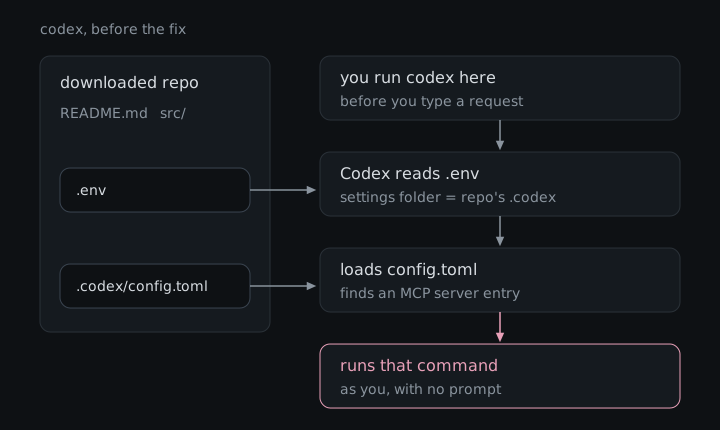
<p>Codex keeps its own settings, including the list of MCP servers to start, in a settings folder in your home directory, and it works out where that folder is every time it starts. One of the things it looks at is a <code class="language-plaintext highlighter-rouge">.env</code> file, a small text file many projects use to set options for the programs run inside them. A project could ship a <code class="language-plaintext highlighter-rouge">.env</code> that pointed Codex’s settings folder at a <code class="language-plaintext highlighter-rouge">.codex</code> folder inside the project itself, so Codex read the project’s settings as if they were yours.</p>

<p>From there the project’s own <code class="language-plaintext highlighter-rouge">config.toml</code>, the settings file inside that folder, could list an MCP server, and an MCP server entry is just a name plus the command to start it. Codex started every server it found as part of starting up, so whatever command the project listed ran immediately, with your permissions, before you had typed anything. There was no prompt, no check of what the command actually was, and no second look if it changed later. Trust was tied to where the settings lived rather than to what they said, so a harmless-looking entry could be merged first and quietly swapped for a malicious one afterwards.</p>

<figure>
  <img src="/assets/img/codex-chain.svg" alt="A downloaded repo contains a .env file and a .codex/config.toml file. When you run codex in it, before you type a request, Codex reads .env, which makes its settings folder the repo's .codex folder, then loads config.toml, finds an MCP server entry, and runs that command as you with no prompt." />
  <figcaption>Two files in the repo, and the command runs before you have typed a word.</figcaption>
</figure>

<p>To prove it, I used two things: a payload that simply created a file, so the result was easy to check, and a version that opened the Calculator app on the victim’s machine. I also showed the same entry could just as easily open a reverse shell, a connection that hands the attacker remote control of the machine. The full proof of concept, with the exact files and screenshots, is in the <a href="https://research.checkpoint.com/2025/openai-codex-cli-command-injection-vulnerability/">Check Point Research write-up</a>.</p>

<p>Attacker path, start to finish:</p>

<ol>
  <li>Publish a project that looks useful, or get a change accepted into one that people already use.</li>
  <li>Add a project settings file that lists an MCP server whose “command” is the attacker’s program, plus, for Codex, a <code class="language-plaintext highlighter-rouge">.env</code> file that points Codex’s settings folder at it.</li>
  <li>Wait for someone to download the project, perhaps precisely so their AI assistant can explain it to them.</li>
  <li>The victim starts the AI tool inside the project folder.</li>
  <li>The tool reads the project’s settings and starts the “helper”, which runs the attacker’s program with the victim’s permissions, either before any trust prompt appears or with no prompt at all.</li>
</ol>

<h2 id="the-same-bug-in-three-other-tools">The same bug in three other tools</h2>

<p><strong>Gemini CLI.</strong> I reported the Gemini version to Google on August 10, 2025. Gemini CLI read MCP servers from a settings file inside the project and started them at launch, and the release that was current that day had no folder trust feature at all. Google accepted it two days later, told me in September that it was reviewing it “against a large number of similar reports”, and then marked it a duplicate of an earlier report with the same root cause. Google confirmed that the other report came first and would be fixed by the same change, but would not tell me anything else about it, including whether it ever got a CVE. It did say the decision on what to disclose is mine, which is how this section exists.</p>

<p>Publicly, Gemini CLI added an opt-in folder trust setting in mid-August 2025, and a change titled “<a href="https://github.com/google-gemini/gemini-cli/pull/7358">Skip MCP server connections in untrusted folders</a>” shipped in v0.4.0 on September 9, 2025. Folder trust stayed switched off by default until <a href="https://github.com/google-gemini/gemini-cli/releases/tag/v0.28.0">v0.28.0</a> in February 2026, so until then that protection only applied to people who had turned it on. Google never told me which change addressed my report, so I am not claiming either one did.</p>

<p>So it’s not just me. In March 2026 Benjamin Faller of Redguard AG reported a different route to the same place, a <code class="language-plaintext highlighter-rouge">.env</code> file that pointed Gemini CLI’s settings folder into the project, which is nearly the Codex bug again. According to <a href="https://www.redguard.ch/blog/2026/06/03/advisory-google-gemini-cli/">Redguard’s advisory</a>, Google accepted the report but declined to assign a CVE on April 16, 2026, and again on May 5, the second time because its internal S2 severity “does not satisfy the required threshold”. Redguard took the matter to MITRE, published its advisory, and on June 12 Google agreed to issue a CVE after all. <a href="https://www.cve.org/CVERecord?id=CVE-2026-13745">CVE-2026-13745</a> came out on September 10 with errors in it and was corrected on September 23, rated High at 7.7 on CVSS v4, with the fix in Gemini CLI 0.39.1 from April 24, 2026. It can’t be the report mine duplicated, since mine came seven months earlier, but it does suggest that getting Google to put a number on this class of bug takes some persistence.</p>

<p><strong>GitHub Copilot CLI.</strong> In February 2026 I reported that Copilot CLI loaded MCP servers from a project’s <code class="language-plaintext highlighter-rouge">.vscode/mcp.json</code> file, which is where VS Code keeps a project’s MCP settings, before it showed its folder trust prompt. GitHub validated the report in March and rated it Low, the same bug that got 9.8 Critical at OpenAI and two 8.7 High ratings at Anthropic. Its reasoning, summarized fairly, is that cloning a repository is already an explicit decision to trust it under GitHub’s shared-responsibility approach, and that what it validated was the narrower problem of the MCP settings loading before a trust prompt that was supposed to come first. It considered my build-server scenario speculative, since I had not demonstrated it, and declined to assign a CVE. I think the trust prompt exists precisely because cloning a repository and trusting it are not the same thing, but it is a consistent position. <a href="https://github.com/github/copilot-cli/releases/tag/v1.0.10">Copilot CLI 1.0.10</a>, released on March 20, 2026, about a week after GitHub validated my report, says that workspace MCP servers from <code class="language-plaintext highlighter-rouge">.mcp.json</code>, <code class="language-plaintext highlighter-rouge">.vscode/mcp.json</code> and <code class="language-plaintext highlighter-rouge">devcontainer.json</code> “are now loaded only after folder trust is confirmed”. The release note does not credit anyone or mention a report.</p>

<p><strong>Claude Code.</strong> This one was found by Aviv Donenfeld, and Check Point Research published his findings in “<a href="https://research.checkpoint.com/2026/rce-and-api-token-exfiltration-through-claude-code-project-files-cve-2025-59536/">Caught in the Hook</a>”. Two of them belong to this class. In the first, hooks (commands Claude Code runs automatically at certain moments) defined in the project’s <code class="language-plaintext highlighter-rouge">.claude/settings.json</code> ran as soon as you accepted the trust dialog, which did not mention that accepting would run anything, and Anthropic fixed it in 1.0.87 under <a href="https://github.com/anthropics/claude-code/security/advisories/GHSA-ph6w-f82w-28w6">GHSA-ph6w-f82w-28w6</a>, rated High 8.7 without a CVE. In the second, a project’s <code class="language-plaintext highlighter-rouge">.mcp.json</code> combined with a project setting that approved its MCP servers automatically started those servers before you could answer the trust dialog, which became <a href="https://github.com/anthropics/claude-code/security/advisories/GHSA-4fgq-fpq9-mr3g">CVE-2025-59536</a>, rated High 8.7 on CVSS v4 and fixed in 1.0.111. The same write-up covers a third issue, CVE-2026-21852, where a project setting could send your API key to a server the attacker chose.</p>

<h2 id="why-the-same-bug-keeps-showing-up">Why the same bug keeps showing up</h2>

<p>These tools were built in a hurry, and it shows. Claude Code arrived in February 2025, Codex CLI in April, Gemini CLI in June, and GitHub’s Copilot CLI reached general availability in February 2026, each launched into a race where shipping the feature everyone else already has tends to beat thinking hard about it. They ended up looking a lot alike: all four run in your terminal, read project settings files, and start MCP helper programs from them, and Copilot CLI’s own release notes list <code class="language-plaintext highlighter-rouge">.mcp.json</code>, the file name Claude Code uses, among the project files it reads. I can’t prove anyone copied anyone’s bug, but when everyone borrows the same idea of letting the project bring its own helpers, it is not much of a surprise that they also borrow the same blind spot about who gets to decide those helpers run.</p>

<h2 id="what-an-attacker-could-do">What an attacker could do</h2>

<p>The attacker’s program runs as the person who opened the project, with everything they can reach. On a developer’s laptop that means SSH keys, cloud credentials, saved logins and the source code of every other project on the machine, and in Check Point’s demonstration for Codex it was enough to open a remote connection back to the attacker. Because Codex tied trust to where the settings lived rather than to what they said, a harmless-looking entry could also be swapped for a malicious one after it was merged, with nothing asking again.</p>

<p>The supply-chain angle is what makes this class interesting. A poisoned template, starter project or popular repository reaches everyone who opens it with one of these tools, and the people most likely to do that are often the ones who want the AI to explain unfamiliar code before they trust it. If a build server runs one of these assistants on a checked-out project, the same settings file is sitting right there, and build servers tend to hold the deploy keys and publishing tokens that turn one compromised project into many. GitHub called that scenario speculative for Copilot CLI, which is fair, since I did not demonstrate it there.</p>

<h2 id="what-it-actually-takes">What it actually takes</h2>

<p>The attacker has to get the settings files into a project the victim will open, which means owning a project people use, getting a change accepted into one, or compromising something it depends on. The victim then has to download that project and start the AI tool inside its folder. For Codex, for Gemini CLI at the time I reported it, and for Copilot CLI before 1.0.10, nothing else was needed, because the helper program started before any question was asked, or without one. For the Claude Code hooks issue the victim also had to accept the trust dialog, which most people do without a second thought, since it is the only thing standing between them and the tool. CISA’s 9.8 for the Codex CVE assumes no user interaction, but in practice someone has to run Codex in the malicious folder.</p>

<h2 id="the-fix">The fix</h2>

<p><strong>Codex CLI</strong> was fixed in August 2025, so update to 0.23.0 or later. According to <a href="https://research.checkpoint.com/2025/openai-codex-cli-command-injection-vulnerability/">Check Point</a>, the fix stops <code class="language-plaintext highlighter-rouge">.env</code> files from quietly moving Codex’s settings folder into a project, and the Codex repository has a change from August 14, 2025 (<a href="https://github.com/openai/codex/pull/2308">#2308</a>) that blocks <code class="language-plaintext highlighter-rouge">.env</code> files from setting any variable whose name starts with <code class="language-plaintext highlighter-rouge">CODEX_</code>.</p>

<p><strong>Gemini CLI</strong> users should be on 0.39.1 or later, which fixes Redguard’s CVE-2026-13745 and arrives with folder trust switched on by default, since that has been the default from v0.28.0. <strong>Copilot CLI</strong> loads workspace MCP servers only after folder trust is confirmed from 1.0.10 on. <strong>Claude Code</strong> fixed the hooks issue in 1.0.87 and the MCP issue in 1.0.111, both released in 2025.</p>

<p>Beyond updating, treat opening a downloaded project in an AI assistant the way you would treat running its install script. Answer “no” to the trust prompt for projects you are only reading, look at what a project ships in its <code class="language-plaintext highlighter-rouge">.env</code>, <code class="language-plaintext highlighter-rouge">.codex</code>, <code class="language-plaintext highlighter-rouge">.gemini</code>, <code class="language-plaintext highlighter-rouge">.vscode</code>, <code class="language-plaintext highlighter-rouge">.claude</code> and <code class="language-plaintext highlighter-rouge">.mcp.json</code> files before you say “yes”, and if you want an AI to explain something from a stranger, do it in a throwaway container or virtual machine that holds none of your keys.</p>

<p>Advisories: <a href="https://nvd.nist.gov/vuln/detail/CVE-2025-61260">CVE-2025-61260</a> · <a href="https://github.com/advisories/GHSA-xrxf-jgv3-qmrm">GHSA-xrxf-jgv3-qmrm</a> · <a href="https://research.checkpoint.com/2025/openai-codex-cli-command-injection-vulnerability/">Check Point Research: Codex CLI</a> · <a href="https://github.com/anthropics/claude-code/security/advisories/GHSA-ph6w-f82w-28w6">GHSA-ph6w-f82w-28w6</a> · <a href="https://github.com/anthropics/claude-code/security/advisories/GHSA-4fgq-fpq9-mr3g">CVE-2025-59536</a> · <a href="https://www.redguard.ch/blog/2026/06/03/advisory-google-gemini-cli/">CVE-2026-13745</a> · <a href="https://github.com/github/copilot-cli/releases/tag/v1.0.10">Copilot CLI 1.0.10</a></p>

<p>Four vendors made the same mistake of letting a project’s own settings start a program before anyone agreed to it, and scored it everything from Critical to Low to a duplicate nobody would explain, so whichever of these tools you use, it is worth making sure it is up to date.</p>]]></content><author><name>Isabel Mill</name></author><category term="cve" /><category term="codex" /><category term="ai" /><category term="code-injection" /><category term="supply-chain" /><summary type="html"><![CDATA[A settings file inside a downloaded project could make OpenAI's Codex CLI start a program of the attacker's choosing, and the same mistake turned up in Gemini CLI, GitHub Copilot CLI and Claude Code.]]></summary><media:thumbnail xmlns:media="http://search.yahoo.com/mrss/" url="https://izzysec.github.io/assets/img/social/codex-cli-config-injection.png" /><media:content medium="image" url="https://izzysec.github.io/assets/img/social/codex-cli-config-injection.png" xmlns:media="http://search.yahoo.com/mrss/" /></entry></feed>