Same design flaw, three different AI coding CLIs, one Critical CVE
CVE-2025-61260 · OpenAI Codex CLI · by izzysec (Check Point Research)
A lot of people now meet unfamiliar code by downloading it and asking an AI assistant to explain it. It feels like the most cautious thing you can do with a stranger’s project, since you are only asking questions about it and not running anything. The AI tools mostly agree, which is why several of them ask whether you trust a folder before they let its contents do anything risky.
In OpenAI’s Codex CLI, a downloaded project could skip that conversation entirely. Two small settings files inside the project were enough to make Codex start a “helper program” of the attacker’s choosing the moment you opened the tool in that folder, with no question asked. No AI was fooled along the way, because Codex simply loaded the project’s settings as if they were your own and ran what they listed. I reported it to OpenAI in August 2025, it was fixed that same month, and it became CVE-2025-61260, which CISA scored 9.8 Critical. The same mistake also turned up in three other AI coding CLIs: Google’s Gemini CLI and GitHub’s Copilot CLI, which I reported, and Anthropic’s Claude Code, where Aviv Donenfeld reported it. The four vendors turned out to have four quite different opinions about how much it matters.
What these tools actually are
AI coding assistants used to live inside code editors, mostly as very confident autocomplete. The current generation are CLIs, short for command-line interfaces, meaning programs you type to in a terminal window rather than click around in. They run inside your project folder, where they read the code, edit files and run commands on your behalf. Anthropic started the trend with Claude Code as a research preview in February 2025, OpenAI followed with Codex CLI in April 2025 as an open source tool released alongside its o3 and o4-mini models, Google released Gemini CLI in June 2025, and GitHub put Copilot CLI into public preview in September 2025 and made it generally available in February 2026.
The numbers, as of November 2026:
| Tool | Launched | GitHub stars | npm downloads, last week | What the vendor says |
|---|---|---|---|---|
| Codex CLI | April 2025 | about 132.7k | about 27.7 million | more than 5 million weekly active users across all of Codex (June 2026) |
| Claude Code | February 2025 | about 154.1k | about 12.1 million | weekly active users doubled since January 1 (February 2026) |
| Gemini CLI | June 2025 | about 108.7k | about 446k | “over one million users” (October 2025) |
| Copilot CLI | September 2025 | about 11.3k | about 1.6 million | no public user count I could find |
Download counts include build servers and automatic updates, so they are not head counts, but they make the point that these tools now get pointed at a very large number of projects every day.
How the attack works
A few terms, once:
- MCP server: MCP (Model Context Protocol) is a common standard for giving AI tools extra abilities, like talking to a database or a ticketing system. An “MCP server” is simply a helper program that the AI tool starts on your computer, and its settings entry is basically a command to run.
- Project settings file: a settings file that lives inside the project folder, which means it was written by whoever wrote the project.
- Trust prompt: the “do you trust this folder?” question some of these tools ask before they let a project’s own settings do anything risky.
.envfile: a small file of environment settings that many tools load automatically from the folder they start in.
Codex keeps its own settings, including the list of MCP servers to start, in a settings folder in your home directory, and it works out where that folder is every time it starts. One of the things it looks at is a .env file, a small text file many projects use to set options for the programs run inside them. A project could ship a .env that pointed Codex’s settings folder at a .codex folder inside the project itself, so Codex read the project’s settings as if they were yours.
From there the project’s own config.toml, the settings file inside that folder, could list an MCP server, and an MCP server entry is just a name plus the command to start it. Codex started every server it found as part of starting up, so whatever command the project listed ran immediately, with your permissions, before you had typed anything. There was no prompt, no check of what the command actually was, and no second look if it changed later. Trust was tied to where the settings lived rather than to what they said, so a harmless-looking entry could be merged first and quietly swapped for a malicious one afterwards.
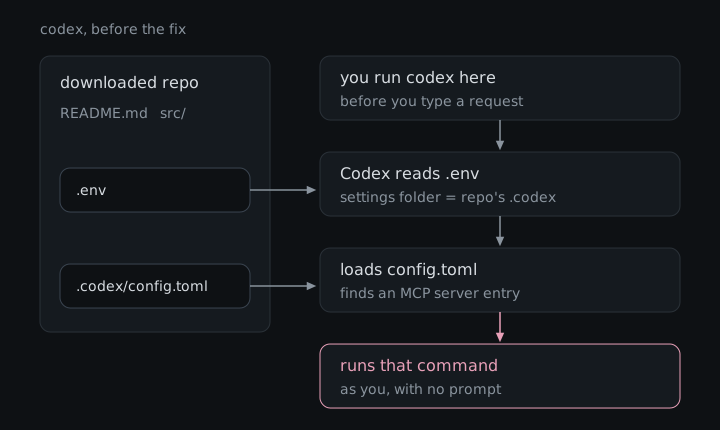
To prove it, I used two things: a payload that simply created a file, so the result was easy to check, and a version that opened the Calculator app on the victim’s machine. I also showed the same entry could just as easily open a reverse shell, a connection that hands the attacker remote control of the machine. The full proof of concept, with the exact files and screenshots, is in the Check Point Research write-up.
Attacker path, start to finish:
- Publish a project that looks useful, or get a change accepted into one that people already use.
- Add a project settings file that lists an MCP server whose “command” is the attacker’s program, plus, for Codex, a
.envfile that points Codex’s settings folder at it. - Wait for someone to download the project, perhaps precisely so their AI assistant can explain it to them.
- The victim starts the AI tool inside the project folder.
- The tool reads the project’s settings and starts the “helper”, which runs the attacker’s program with the victim’s permissions, either before any trust prompt appears or with no prompt at all.
The same bug in three other tools
Gemini CLI. I reported the Gemini version to Google on August 10, 2025. Gemini CLI read MCP servers from a settings file inside the project and started them at launch, and the release that was current that day had no folder trust feature at all. Google accepted it two days later, told me in September that it was reviewing it “against a large number of similar reports”, and then marked it a duplicate of an earlier report with the same root cause. Google confirmed that the other report came first and would be fixed by the same change, but would not tell me anything else about it, including whether it ever got a CVE. It did say the decision on what to disclose is mine, which is how this section exists.
Publicly, Gemini CLI added an opt-in folder trust setting in mid-August 2025, and a change titled “Skip MCP server connections in untrusted folders” shipped in v0.4.0 on September 9, 2025. Folder trust stayed switched off by default until v0.28.0 in February 2026, so until then that protection only applied to people who had turned it on. Google never told me which change addressed my report, so I am not claiming either one did.
So it’s not just me. In March 2026 Benjamin Faller of Redguard AG reported a different route to the same place, a .env file that pointed Gemini CLI’s settings folder into the project, which is nearly the Codex bug again. According to Redguard’s advisory, Google accepted the report but declined to assign a CVE on April 16, 2026, and again on May 5, the second time because its internal S2 severity “does not satisfy the required threshold”. Redguard took the matter to MITRE, published its advisory, and on June 12 Google agreed to issue a CVE after all. CVE-2026-13745 came out on September 10 with errors in it and was corrected on September 23, rated High at 7.7 on CVSS v4, with the fix in Gemini CLI 0.39.1 from April 24, 2026. It can’t be the report mine duplicated, since mine came seven months earlier, but it does suggest that getting Google to put a number on this class of bug takes some persistence.
GitHub Copilot CLI. In February 2026 I reported that Copilot CLI loaded MCP servers from a project’s .vscode/mcp.json file, which is where VS Code keeps a project’s MCP settings, before it showed its folder trust prompt. GitHub validated the report in March and rated it Low, the same bug that got 9.8 Critical at OpenAI and two 8.7 High ratings at Anthropic. Its reasoning, summarized fairly, is that cloning a repository is already an explicit decision to trust it under GitHub’s shared-responsibility approach, and that what it validated was the narrower problem of the MCP settings loading before a trust prompt that was supposed to come first. It considered my build-server scenario speculative, since I had not demonstrated it, and declined to assign a CVE. I think the trust prompt exists precisely because cloning a repository and trusting it are not the same thing, but it is a consistent position. Copilot CLI 1.0.10, released on March 20, 2026, about a week after GitHub validated my report, says that workspace MCP servers from .mcp.json, .vscode/mcp.json and devcontainer.json “are now loaded only after folder trust is confirmed”. The release note does not credit anyone or mention a report.
Claude Code. This one was found by Aviv Donenfeld, and Check Point Research published his findings in “Caught in the Hook”. Two of them belong to this class. In the first, hooks (commands Claude Code runs automatically at certain moments) defined in the project’s .claude/settings.json ran as soon as you accepted the trust dialog, which did not mention that accepting would run anything, and Anthropic fixed it in 1.0.87 under GHSA-ph6w-f82w-28w6, rated High 8.7 without a CVE. In the second, a project’s .mcp.json combined with a project setting that approved its MCP servers automatically started those servers before you could answer the trust dialog, which became CVE-2025-59536, rated High 8.7 on CVSS v4 and fixed in 1.0.111. The same write-up covers a third issue, CVE-2026-21852, where a project setting could send your API key to a server the attacker chose.
Why the same bug keeps showing up
These tools were built in a hurry, and it shows. Claude Code arrived in February 2025, Codex CLI in April, Gemini CLI in June, and GitHub’s Copilot CLI reached general availability in February 2026, each launched into a race where shipping the feature everyone else already has tends to beat thinking hard about it. They ended up looking a lot alike: all four run in your terminal, read project settings files, and start MCP helper programs from them, and Copilot CLI’s own release notes list .mcp.json, the file name Claude Code uses, among the project files it reads. I can’t prove anyone copied anyone’s bug, but when everyone borrows the same idea of letting the project bring its own helpers, it is not much of a surprise that they also borrow the same blind spot about who gets to decide those helpers run.
What an attacker could do
The attacker’s program runs as the person who opened the project, with everything they can reach. On a developer’s laptop that means SSH keys, cloud credentials, saved logins and the source code of every other project on the machine, and in Check Point’s demonstration for Codex it was enough to open a remote connection back to the attacker. Because Codex tied trust to where the settings lived rather than to what they said, a harmless-looking entry could also be swapped for a malicious one after it was merged, with nothing asking again.
The supply-chain angle is what makes this class interesting. A poisoned template, starter project or popular repository reaches everyone who opens it with one of these tools, and the people most likely to do that are often the ones who want the AI to explain unfamiliar code before they trust it. If a build server runs one of these assistants on a checked-out project, the same settings file is sitting right there, and build servers tend to hold the deploy keys and publishing tokens that turn one compromised project into many. GitHub called that scenario speculative for Copilot CLI, which is fair, since I did not demonstrate it there.
What it actually takes
The attacker has to get the settings files into a project the victim will open, which means owning a project people use, getting a change accepted into one, or compromising something it depends on. The victim then has to download that project and start the AI tool inside its folder. For Codex, for Gemini CLI at the time I reported it, and for Copilot CLI before 1.0.10, nothing else was needed, because the helper program started before any question was asked, or without one. For the Claude Code hooks issue the victim also had to accept the trust dialog, which most people do without a second thought, since it is the only thing standing between them and the tool. CISA’s 9.8 for the Codex CVE assumes no user interaction, but in practice someone has to run Codex in the malicious folder.
The fix
Codex CLI was fixed in August 2025, so update to 0.23.0 or later. According to Check Point, the fix stops .env files from quietly moving Codex’s settings folder into a project, and the Codex repository has a change from August 14, 2025 (#2308) that blocks .env files from setting any variable whose name starts with CODEX_.
Gemini CLI users should be on 0.39.1 or later, which fixes Redguard’s CVE-2026-13745 and arrives with folder trust switched on by default, since that has been the default from v0.28.0. Copilot CLI loads workspace MCP servers only after folder trust is confirmed from 1.0.10 on. Claude Code fixed the hooks issue in 1.0.87 and the MCP issue in 1.0.111, both released in 2025.
Beyond updating, treat opening a downloaded project in an AI assistant the way you would treat running its install script. Answer “no” to the trust prompt for projects you are only reading, look at what a project ships in its .env, .codex, .gemini, .vscode, .claude and .mcp.json files before you say “yes”, and if you want an AI to explain something from a stranger, do it in a throwaway container or virtual machine that holds none of your keys.
Advisories: CVE-2025-61260 · GHSA-xrxf-jgv3-qmrm · Check Point Research: Codex CLI · GHSA-ph6w-f82w-28w6 · CVE-2025-59536 · CVE-2026-13745 · Copilot CLI 1.0.10
Four vendors made the same mistake of letting a project’s own settings start a program before anyone agreed to it, and scored it everything from Critical to Low to a duplicate nobody would explain, so whichever of these tools you use, it is worth making sure it is up to date.