How a line break got me code execution on your build server
CVE-2026-105802 · Git LFS · reported by izzysec
Almost all software today is built on code written by people you have never met, and setting up someone else’s project usually means downloading it and following the steps in its instructions. Most people assume the download itself is harmless, and Git, the tool that does the downloading, mostly agrees, as does Git LFS, a popular add-on that helps Git handle big files like videos, game assets and AI models. Git LFS has a clear rule that a project you download does not get to tell it which programs to run on your computer.
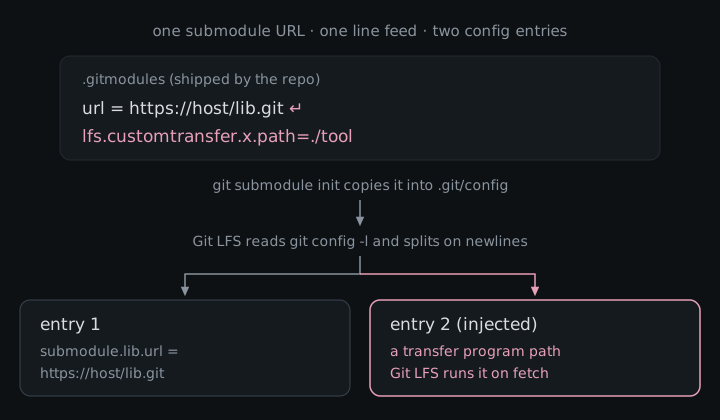
I got around that rule with nothing fancier than a line break. A project can list the address of another project it depends on, and when that address had a hidden line break in it, Git LFS read the text after the break as a brand new setting that it believed you had written yourself. That setting can point at a program tucked inside the project, and Git LFS runs it the next time it downloads a big file. Build servers download and set up projects automatically all day, so on one of those the attacker’s program runs with whatever secrets the server can reach. That bug is CVE-2026-105802, I reported it, and Git LFS fixed it in version 3.8.1.
What Git LFS actually is
Git was built for source code, and it is famously bad at large binaries because every clone drags down every version of every file. Git LFS (Large File Storage) works around that by committing a small text pointer in place of each big file and keeping the real content on a separate LFS server, which it downloads when you check the file out. GitHub announced it in April 2015 as an open source, MIT-licensed extension for “audio samples, datasets, graphics, and videos”, and the git-lfs/git-lfs repo itself goes back to September 2013, with its first tagged release in August 2014.
It was not the first attempt at the problem. git-annex has been around since at least 2010 (it was in Debian that November), and smaller tools like git-fat and git-media handled large files outside Git in similar ways. These days Git itself also has partial clone with promisor remotes, which can skip downloading old versions of large binary assets. What Git LFS has going for it is that the big forges adopted it: GitLab enables it by default on GitLab.com and self-managed instances, Bitbucket and Azure DevOps document it as the way to handle large binaries, GitHub’s own actions/checkout has an lfs switch, and Git for Windows ships it bundled and enabled by default. Even the Hugging Face Hub historically relied on Git LFS for model weights, and still supports it after moving to its own Xet storage.
The numbers, as of November 2026:
| Where | What |
|---|---|
| GitHub repo | about 14.5k stars, 2.3k forks |
| GitHub release assets | about 31 million downloads across 97 releases, and about 97k for v3.8.1 alone in its first ten days |
| Homebrew | about 263k installs in the last year |
| Git for Windows | bundled and on by default, so a lot of people have it without ever installing it on purpose |
So Git LFS sits on a huge number of developer laptops and CI runners, and a bug that fires on clone-and-setup is a supply-chain bug almost by definition.
How the attack works
A few terms, once:
- Git config: the list of settings Git and Git LFS read, stored in a few files on your machine, including one inside every project you download.
- Repo settings file: a project can ship its own Git LFS settings file (called
.lfsconfig), but Git LFS only accepts harmless options from it, and anything that names a program to run is blocked. - Submodule: a project nested inside another project, like a library it depends on. The outer project lists the submodule’s address in a file it ships.
- Submodule init: the setup step (
git submodule init) that copies those addresses into your own local settings, which Git LFS trusts completely because it assumes you wrote them. - Transfer adapter / extension: Git LFS features that let you name an outside program to download your big files or to process them when you save or open them.
Here is where it breaks. Git LFS read your settings by asking Git for the whole list and cutting it up line by line, treating each line as one setting. The problem is that a setting’s value is allowed to contain a line break, and in that list the line break inside a value looks exactly like the line break between two settings. So a submodule address with a hidden line break, followed by something that looks like a Git LFS setting, comes out the other end as two settings, and Git LFS believes both. The project is not allowed to name programs through its own settings file, but it is allowed to list a submodule address, and the setup step politely copies that address into the one place Git LFS trusts without question. Git does not even visit the address during that step, so nothing looks off.
Attacker path, start to finish:
- Create a repo that tracks some files with Git LFS and declares a submodule.
- Give that submodule an address with a hidden line break in it, followed by a Git LFS setting that names a program as a transfer adapter or extension.
- Ship that program inside the project itself, which is exactly how Git LFS’s own test for this bug is built.
- Get the victim, or their build server, to download the project and run the submodule setup step, which many setups do automatically.
- The next time Git LFS downloads big files or the victim saves a tracked file, it runs the attacker’s program with the victim’s permissions.
Git LFS’s own test shows how quiet this can be. The injected setting replaces one of Git LFS’s built-in download helpers, so a completely ordinary download command is what ends up starting the attacker’s program.
The second bug: unquoted SSH paths
While digging around Git LFS I also reported a second bug, CVE-2026-69260, though @dungNHVhust reported it first, so the advisory is credited to them. It belongs in this post because it is the same mistake in a different spot: Git LFS again took text from a downloaded project and used it without cleaning it up first. Git LFS can talk to its file server over SSH, the same secure remote login developers use to reach servers. When it does, it logs in and asks the server to run a small Git LFS command, and it passed along the project’s path from the server address without wrapping it in quotes. A project’s settings file is allowed to choose that server address, so a malicious project could pick an address whose path contained characters a server’s command line treats as “and now run this too”, like a semicolon.
The difference is where the code runs. This one executes on the remote SSH host, as whatever account the victim’s SSH client logs in to, and only if that host hands the command string to a shell without sanitizing it. Servers that parse the command properly are not affected, and GitHub’s advisory reflects that condition by scoring it 7.6 with attack requirements present, against 8.6 for the first bug.
| CVE-2026-105802 | CVE-2026-69260 | |
|---|---|---|
| Where the trick hides | a submodule address | the file server address in the project’s settings |
| What goes wrong | a line break splits one setting into two | the server path is sent without quotes |
| Where code runs | the victim’s machine | the SSH server, if it passes commands to a shell |
| Affected since | 0.6.0 | 0.5.0 |
| GitHub advisory severity | High, CVSS v4 8.6 | High, CVSS v4 7.6 |
What an attacker could do
The attacker’s program runs as whoever downloaded the project, with all of their access. On a developer’s laptop that means things like SSH keys, saved logins and the code of every other project they work on, and on a build server it means the deploy keys and tokens that server uses. If those keys can push code or publish releases, the attacker can move from one poisoned project into everything that server builds, which is how a single bad download turns into a supply-chain problem. The second bug, CVE-2026-69260, reaches less far, because its command runs on the SSH server as the account the victim logs in to, and only when that server hands the command to a shell without cleaning it first.
What it actually takes
For CVE-2026-105802 the victim has to clone a repository the attacker controls or has slipped a change into, initialize its submodules, and then run a Git LFS operation that fetches objects or adds a tracked file. For CVE-2026-69260 the victim has to use Git LFS on a project whose settings point at an SSH server address, and that server has to pass the command to its command line without cleaning it. Every Git LFS release from 0.6.0 through 3.8.0 is affected by both, on every operating system Git LFS supports. Neither had a CVE record or NVD score when I checked, so the severities above are the ones from GitHub’s advisories.
The fix
Both are patched in Git LFS 3.8.1 (release notes), along with two other fixes in the same release.
For CVE-2026-105802, commit 39b73aa makes Git LFS ask Git for the settings list in a format where each setting ends with a special invisible marker instead of a line break, so a line break inside a value stays inside that value. The commit adds tests that try to inject both a transfer adapter and a pointer extension through a submodule URL and check that neither runs. If you cannot upgrade yet, the advisory recommends skipping the submodule setup step entirely and turning off the Git options that run it automatically.
For CVE-2026-69260, commit 92d8111 wraps everything Git LFS sends to the server in proper quotes, the same way Git itself does. The advisory also says server operators should clean incoming commands either way.
Advisories: GHSA-xrgv-7vx6-5vx6 · CVE-2026-105802 · GHSA-w3f2-pr6x-wwjc · CVE-2026-69260
Both bugs came down to Git LFS treating text from a cloned repo as if it were already parsed and quoted, and 3.8.1 makes it do that work itself.