How I got malware past code review
CVE-2026-95106 · Gitea · reported by izzysec
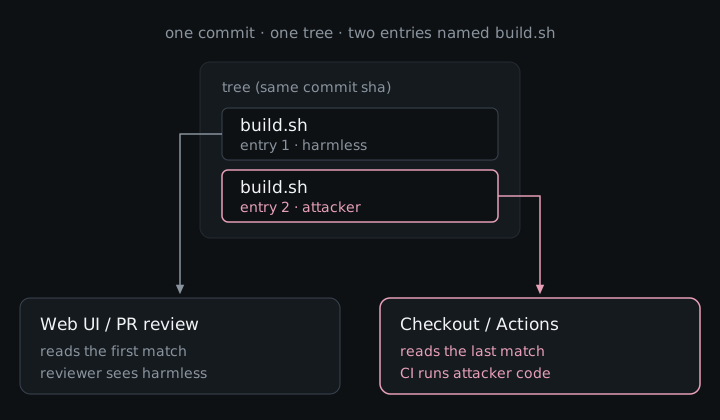
Imagine you open a pull request that looks boring on purpose. The Files changed tab only shows a tidy build.sh, so a reviewer approves exactly what the UI put in front of them, and then Gitea Actions checks out that exact commit and runs a different build.sh (the one with your payload) with the repo’s CI secrets sitting right there. Same commit hash, two files with the same name: the web UI showed the first one, checkout used the last. That mismatch is CVE-2026-95106.
What Gitea actually is
Gitea is the self-hosted forge people reach for when GitHub or GitLab SaaS is not the plan. One binary (or a Docker container) gives you issues, PRs, a package registry, and CI via Gitea Actions, which is exactly what teams want when the code has to stay on their own machines because of air-gapped networks, privacy rules, cost, or the simple preference for running their own stuff.
It is not niche. As of late October 2026 the go-gitea/gitea repo sits around 59k GitHub stars, the official gitea/gitea image on Docker Hub has roughly 393 million pulls, and a May 2026 Shodan sweep covered by SecurityWeek found about 34,000 internet-facing instances, with a big chunk of those living on real cloud or VPS hosts. So when review and execution disagree on Gitea, you are talking about a lot of self-hosted supply chains, not a lab curiosity.
How the attack works
A few terms, once:
- Tree: git’s snapshot of a directory, a list of entries where each entry has a name and points to a file.
- Checkout: unpacking that snapshot onto disk (
git checkout, or what CI does when it clones your PR). - CI / Gitea Actions: the bots that clone the PR commit and run whatever workflow you configured, usually with secrets.
The mismatch is almost embarrassingly simple once you see how the UI looks up a file. Gitea walks the tree’s entry list looking for the name you asked for (say build.sh), returns the first match, and stops. It never scrolls down to notice that a second entry with the same name is sitting later in the list. Checkout, Gitea Actions, and release archives do the opposite: when the same name appears twice, they use the last one. Most people review in the browser, so the only copy they are ever shown is the decoy.
Attacker path, start to finish:
- Build two blobs. One is harmless (
echo BENIGN). One is whatever you want CI to run. - Hand-craft a tree where
build.shappears twice: benign first, evil last. - Wrap it in a normal commit and push a branch, then open a PR against a repo that runs Actions on pull requests.
- Watch the PR diff and file view. Because Gitea’s name lookup returns the first match and stops, reviewers see the clean script.
- Wait for approval (or whatever your target needs). Actions checks out the same sha, and because checkout and
git archiveresolve the last entry, your script runs with CI secrets.
| Same commit | What you get |
|---|---|
| Gitea web UI / PR Files changed | first build.sh (benign) |
git checkout, Gitea Actions, release archives |
last build.sh (attacker code) |
Why didn’t Gitea reject it?
You might be wondering how a commit with two files named build.sh ever got into the repo at all. Git itself already knows that is illegal. Its built-in health check (git fsck) calls it an ERROR named duplicateEntries, and everyday git commands refuse to create a tree like that. The attacker has to write the raw tree bytes by hand and force them in.
Here is the catch: when someone pushes to a server, git does not run that health check by default. The settings that would (receive.fsckObjects / transfer.fsckObjects) start turned off, so a forge only rejects these weird trees if someone explicitly turns the check on.
GitLab already did. Gitaly checks incoming objects on push and only skips a few cosmetic rules by default (badTimezone, missingSpaceBeforeDate, zeroPaddedFilemode). Duplicate names are not on that skip list, so GitLab rejects this push.
Gitea just never turned the switch on. The malformed tree was accepted, the web UI showed the first build.sh, and checkout used the second.
What an attacker could do
Gitea runs CI workflows with whatever secrets and tokens the repository owner gave them, so a script that slips past review gets exactly the same access. At the very least it can read and send out those secrets, and if the tokens are allowed to push code or publish packages, it can also plant a backdoor in the project or tamper with the release files people download, since git archive builds them from the same hidden copy of the file. The logs show one commit hash for both the code that was reviewed and the code that ran, so anyone checking later would find nothing out of place, and for a project that publishes what its CI builds, a single approved pull request could end up in the hands of everyone who installs the next release.
What it actually takes
You need push or PR access (a fork is enough on many setups), a workflow that actually runs something from the checked-out tree, and a review path that goes through the web UI. It is a supply-chain problem because code review is the gate, and the gate looked at the wrong file: same sha in the log, different bytes on the runner.
The fix
Patched in Gitea 28.0.0 (release notes, PR #39472). Incoming pushes and transfers now run git’s object consistency checks, so duplicateEntries gets rejected before storage. Existing objects already sitting in old repos are not rescanned, so upgrade, and if you inherited weird history, go look.
Advisory: GHSA-6pv5-8rp7-8c75 · CVE-2026-95106
Gitea now runs the same push check GitLab already had, which means the review and the runner finally see the same file.